Understanding AI Motion Tracking AI
The creative components of video editing and production have been transformed by artificial intelligence. The most impactful use of AI is AI motion tracking, which lets editors follow and track the movement of people or objects in a scene with precision, then attach effects, text, or animation that travels with them.
This editing process that once took hours for expert editors can now be completed in minutes using AI-powered tools as of 2026. This guide will review what AI motion tracking is, how it works, the advantages and limitations of real-life use, and the best tools available in the marketplace today.
What is AI Motion Tracking?
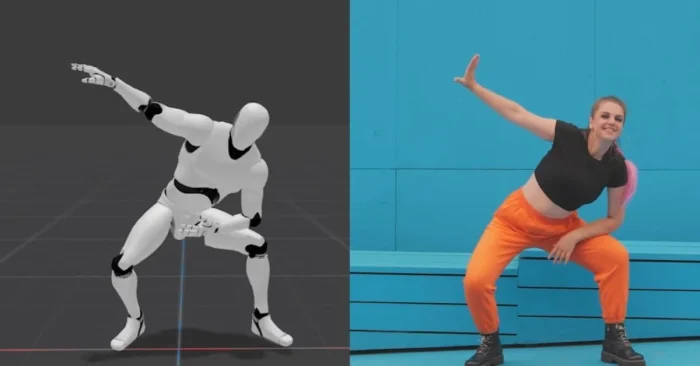
It is the use of artificial intelligence to detect, track and analyze the movement of objects, people, or other elements in a video. Traditional tracking requires keyframing, while AI tracking allows you to automatically track objects, which is faster and more accurate.
How Does It Work?
These tools use computer vision and machine learning algorithms to identify patterns, shapes and movements. The AI identifies the subject and applies a virtual tracker which can be used to attach graphics, text, effects, or masks that travels with the subject in a smooth manner throughout the video.
Why AI Motion Tracking should matter for modern creators
Motion tracking is essential for producing professional, dynamic, and engaging video content. As of 2026, it enables creators across social media, film or television, branded content, sports analytics, and education to add cinematic effects with less technical skill. See AI Tools for Video Creators for practical workflows. For broader cinematic workflows, also explore AI Cinematic Tools.
Core Features of AI Motion Tracking Tools
- Automatic detection of moving subjects
- Real-time object tracking
- Ability to attach text, logos, or animations
- Masking and background replacement
- Stabilization for shaky footage
- Support for 2D and 3D tracking
Benefits and Limitations
Advantages of AI Motion Tracking
AI tracks objects quickly, maximizing speed and precision while minimizing manual keyframing, which tends to be slower and less effective. Creatives can produce professional effects, increase the potential of their storytelling, and hold an audience’s attention through dynamic visuals.
Challenges and Limitations
As effective as they are, some AI tracking tools struggle with complex backgrounds, overlapping objects, or inconsistent lighting. High-quality output often necessitates premium tools, and the automated nature also allows little room for articulated, fine-tuned creative control, especially for advanced editors.
Who Benefits from AI Motion Tracking?
Its benefits content creators, digital marketers, filmmakers, sports analysts, and educators. Ultimately, we may have seen the last of the appearance of brands. While placing product logos can rely on AI in ads, the same process could support a movie à la James Bond.
Top Use Cases of AI Motion Tracking
- Adding logos or text that follows moving subjects
- Replacing backgrounds in real-time
- Sports video analysis and highlights
- Augmented reality (AR) overlays and cinematic trailer AI workflows
- Creative filmmaking and music videos
For cinematic trailer workflows, see Cinematic Trailer AI Tools.
Top 5 AI Motion Tracking Tools
1. Adobe After Effects (with AI-powered trackers)
A leading professional tool offering powerful AI-powered object tracking for cinematic effects.
2. Runway ML
A beginner-friendly yet advanced AI video editor that includes automatic object tracking, masking, and background replacement features.
3. DaVinci Resolve
Known for professional editing and color grading, it also includes AI-driven motion tracking for text, effects, and object tracking.
4. HitFilm
An accessible video editing platform with tools that integrate AI effects for creators and small businesses.
5. Mocha Pro
Industry-standard in software, widely used in Hollywood productions, offering planar tracking powered by AI.
FAQs About AI Motion Tracking
Is AI motion tracking better than manual tracking?
Yes, for most cases. AI saves time and improves accuracy, but manual adjustments may still be necessary for complex shots.
Can beginners use AI motion tracking tools?
Absolutely. Many platforms are designed for non-professionals, offering simple interfaces with automated tracking features.
Do these tools work in real-time?
Some advanced platforms, such as Runway ML and AR-based tools, support real-time motion tracking, while others process after recording.
Are AI motion tracking tools free?
Basic versions may be free, but advanced features such as 3D tracking or high-resolution exports often require paid plans.