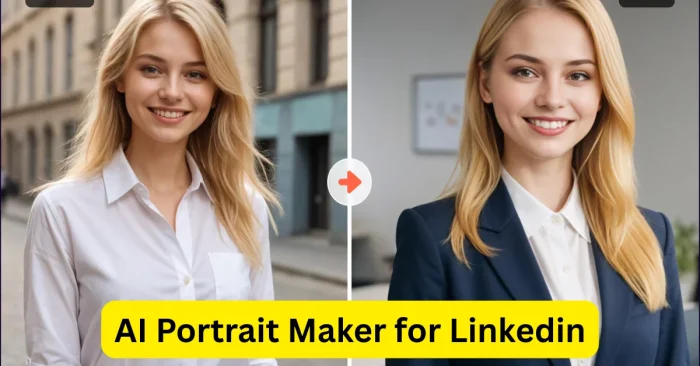
Introduction to AI Portrait Maker for LinkedIn
Creating a professional LinkedIn profile picture is essential for personal branding and networking. As of 2026, many professionals rely on AI Profile Picture Generator tools to produce high-quality, realistic portraits that meet LinkedIn’s professional standards. These tools analyze facial features, lighting, and composition to create images that convey professionalism and approachability. Users can create polished headshots in minutes, eliminating the need for expensive photography sessions or complicated editing software.
Why AI Portrait Makers Are Useful
AI portrait makers are useful for job seekers, entrepreneurs, and professionals who want a strong first impression on LinkedIn. They save time, reduce costs, and provide multiple stylistic options, including formal, casual, and creative looks. These tools can enhance facial features, adjust lighting, and remove distractions, ensuring that profile pictures appear clear, engaging, and professional. For individuals looking to boost their online presence, AI tools for LinkedIn networking offer a convenient solution that aligns with LinkedIn’s professional standards.
Key Features of AI Portrait Maker Tools
AI portrait maker tools offer features such as background removal, automatic retouching, and style customization. Some tools allow users to adjust the expression, clothing, and accessories to match the professional context of their LinkedIn profile. High-resolution output ensures that images look sharp across devices, while AI-driven algorithms maintain natural-looking results. Many platforms also include batch processing for creating multiple profile pictures quickly, making them suitable for companies managing team profiles. For a broader overview of how portrait generators work, see AI Portrait Generator Tools.
Benefits of Using AI Portrait Makers for LinkedIn
Using AI portrait makers for LinkedIn offers several advantages. First, they create visually appealing and professional images that improve personal branding. Second, they save time and money compared to hiring professional photographers. Third, users gain creative flexibility to adjust styles and features without compromising authenticity. Additionally, AI portrait tools help individuals stand out in a crowded professional network by presenting polished and consistent imagery, enhancing credibility and trust with potential employers, partners, and clients. For a broader discussion of customization options, see AI Portrait Generator Tools.
Popular AI Portrait Maker Tools
Several AI-powered tools are popular for creating LinkedIn portraits:
- Remini: Enhances existing photos and creates professional-quality headshots.
- Fotor AI: Offers portrait generation and customization for professional profile images.
- PortraitAI: Specializes in realistic AI-generated portraits suitable for professional use.
- Generated Photos: Provides high-resolution AI-generated faces for LinkedIn profiles and corporate use.
- VanceAI: Offers AI tools for portrait enhancement, background removal, and style adjustments.
For a broader look at how these generators compare, see our overview of AI Portrait Generator Tools.
How AI Portrait Makers Work
Face Analysis
The AI analyzes facial features such as eyes, nose, mouth, and skin tone to generate a balanced and realistic portrait.
Style Customization
Users can select professional styles, including formal business attire, background colors, and lighting adjustments to match LinkedIn’s aesthetic.
Automatic Retouching
AI tools automatically remove blemishes, smooth skin, and adjust lighting to ensure the portrait looks polished without appearing artificial.
Background Adjustment
Users can remove or replace backgrounds with neutral or professional settings, making the portrait suitable for LinkedIn and other professional platforms.
High-Resolution Output
AI-generated portraits are exported in high-resolution formats, ensuring clarity and quality across different devices and LinkedIn profile layouts.
Frequently Asked Questions (FAQs)
Can AI portrait makers create professional LinkedIn profile pictures?
Yes, AI portrait makers generate high-quality, realistic headshots that meet professional standards for LinkedIn profiles. For a deeper dive into how these tools work, see AI Portrait Generator Tools.
Which AI portrait tool is best for LinkedIn?
Remini, Fotor AI, PortraitAI, Generated Photos, and VanceAI are all excellent choices, offering customization and high-resolution outputs suitable for LinkedIn. For more on the different types of portrait generation tools, visit AI Portrait Generator Tools.
Do AI portrait makers require prior photos?
Some tools generate portraits from scratch using AI, while others enhance existing photos to create professional-quality headshots. See AI Portrait Generator Tools for a comparative overview.
Are AI portrait makers free?
Many AI portrait tools offer free versions with limited features, while premium plans provide advanced customization, higher resolution outputs, and commercial use options.
Can I customize the AI-generated portraits?
Yes, most AI portrait makers allow users to adjust styles, backgrounds, expressions, and professional attire to match LinkedIn’s standards. For a detailed look at customization options, check AI Portrait Generator Tools.