Introduction to AI Prompt for Landscapes Tools
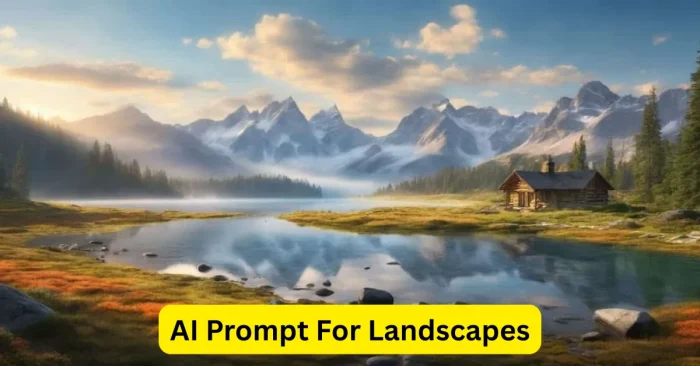
AI Prompt for Landscapes tools are advanced platforms that convert text descriptions into highly realistic and visually appealing landscape images. As AI image generation has evolved through the 2020s, these tools use powerful models, including generative adversarial networks (GANs) and diffusion models, to create mountains, forests, rivers, cityscapes, and more. They are widely used by digital artists, content creators, marketers, and game developers to produce concept art, virtual environments, marketing visuals, and social media graphics. By specifying elements such as scenery type, weather, time of day, color palette, and mood, users can generate detailed landscape images quickly and efficiently, even without any prior design skills. For broader prompt-writing ideas, see AI Prompt Ideas For Midjourney.
How AI Prompt for Landscapes Works
These tools rely on AI models trained on millions of landscape images. Users provide detailed prompts that describe the scene, including objects, colors, lighting, and style. The AI interprets the prompt and generates multiple high-quality images, giving users several options to choose from. Users can refine the output by adjusting lighting, composition, style, and other visual elements. Many tools also allow exporting images in high resolution, making them suitable for digital use, print, marketing campaigns, or gaming projects. This process streamlines landscape creation while offering creative flexibility and precision. In 2024-2025, iterative prompts, in-app previews, and built-in upscaling have become common features that further enhance control.
Key Features of AI Prompt for Landscapes Tools
Text-to-Landscape Generation
Create stunning landscapes directly from textual prompts, saving time and effort compared to manual illustration.
Multiple Variations
Generate several image versions for each prompt, allowing selection or combination to meet creative needs.
Style and Mood Customization
Adjust artistic styles, lighting, color palettes, and mood to create unique and visually appealing landscapes.
High-Resolution Export
Export AI-generated landscapes in high resolution, suitable for web, social media, print, and commercial applications.
User-Friendly Interface
Intuitive platforms allow beginners and professionals to create realistic landscapes efficiently with minimal learning curve.
Top AI Prompt Tools for Landscapes
Several AI tools excel at generating high-quality landscapes:
- MidJourney – Produces detailed and artistic landscape visuals with high realism and style options.
- DALL·E 3 – Offers diverse, customizable landscapes with AI-assisted style adjustments.
- Stable Diffusion – Provides flexibility in creating landscapes with control over details and composition.
- Bing AI Image Creator – Accessible AI tool for generating quality landscape images online.
- Runway ML – Advanced platform for AI-generated landscape creation and refinement.
- Fotor AI Landscape Generator – User-friendly tool for realistic or stylized landscape images from text prompts.
Beyond landscapes, you can explore related AI prompt resources such as AI Prompt For Fantasy Art, Text Prompts For AI Image Tools, and AI Prompt For 3d Art to broaden your prompt-writing skills.
Benefits of Using AI Prompt for Landscapes Tools
These AI tools save time and reduce effort, making landscape creation efficient and accessible. They allow experimentation with multiple styles, lighting conditions, and environmental effects, enhancing creativity and output quality. High-resolution outputs can be used for social media, marketing, game design, virtual environments, and print projects. Their ease of use ensures that both beginners and professionals can achieve professional-quality landscapes. The availability of multiple variations and customization options ensures flexibility, making it easier to produce the exact scenery envisioned. As licensing terms continue to evolve, many platforms offer clearer guidelines on commercial use; always review the terms. For product-focused visuals, see AI Prompt For Product Photos.
Workflow Tips for Using AI Prompt for Landscapes Tools
Provide Detailed Prompts
Include scenery type, elements, time of day, weather, style, mood, and technical preferences (such as aspect ratio or camera angle) to improve accuracy and quality of generated landscapes. Iterative prompts and in-app previews have become common features in recent tools, helping users confirm options before final export.
Experiment with Styles
Try different artistic styles, color palettes, and lighting settings to create unique and visually engaging landscapes.
Generate Multiple Variations
Create several outputs per prompt to select the best option or combine elements creatively for a customized look.
Refine and Enhance
Use editing tools or external software to adjust composition, lighting, and details for polished results.
Export in High Resolution
Save images in high resolution to ensure professional quality for digital or print projects.
Frequently Asked Questions (FAQs)
What are AI Prompt tools for landscapes?
AI Prompt tools for landscapes are platforms that generate realistic or artistic landscape images from text descriptions using AI models.
Are these AI-generated landscapes free to use?
Licensing varies; many platforms offer free tiers with restrictions, while commercial use or high-resolution exports may require a paid plan or explicit license. Always check the platform’s terms before commercial use.
Do I need design skills to use these tools?
No, AI landscape generators are user-friendly and allow anyone to create realistic landscapes from text prompts.
Can AI-generated landscapes be used commercially?
Usage depends on the platform’s licensing terms; many allow commercial use, but it’s recommended to verify rights before commercial application.
How can I improve the quality of AI-generated landscapes?
Provide detailed prompts, test multiple variations, refine outputs, adjust styles, and export in high resolution for professional-quality results.