Introduction to AI Prompt for Realistic Faces Tools
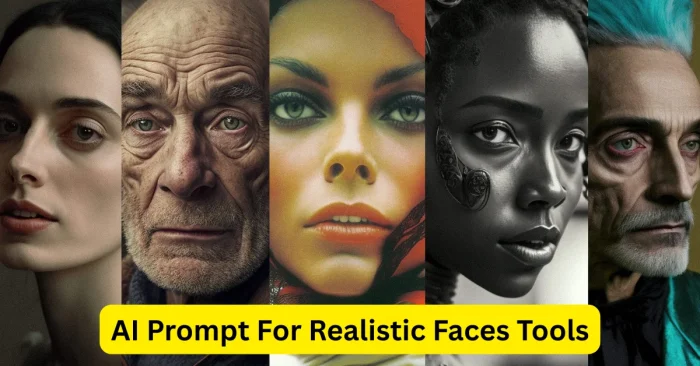
AI Prompt for Realistic Faces tools are specialized platforms that generate highly lifelike human faces from text-based prompts. These tools leverage advanced artificial intelligence and neural networks trained on extensive facial datasets. They’re widely used by digital artists, game developers, marketers, and content creators to produce realistic avatars, character concepts, social visuals, and marketing assets. By describing age, gender, ethnicity, expressions, or hairstyles in plain text, users can quickly generate faces with precise details. Note that licensing terms vary by platform, so check current rights before use. These tools have become accessible to both beginners and professionals, enabling realistic visuals without manual drawing skills. For broader AI-assisted visuals, explore Text Prompts For AI Image Tools, or if you’re working with 3D art, see AI Prompt for 3D Art. If you’re exploring fantasy or landscapes, check AI Prompt For Fantasy Art or AI Prompt For Landscapes for related prompts.
How AI Prompt for Realistic Faces Works
AI tools for realistic face generation employ deep learning algorithms and generative adversarial networks (GANs) or diffusion models. Users input detailed prompts describing facial features, expressions, age, gender, and background preferences. The AI then produces highly realistic faces based on the provided descriptions. Many platforms generate multiple variations per prompt, enabling users to select the most suitable output. These tools often provide refinement options, such as adjusting facial details, lighting, and expression, or exporting images in high resolution for digital, print, or commercial use. This combination of precision and flexibility makes AI face generators highly efficient for creative workflows. As of 2025, ongoing updates continue to improve realism and reduce artifacts across prompts and styles.
Key Features of AI Prompt for Realistic Faces Tools
These tools offer numerous features to enhance realism and user control:
Text-to-Face Generation
Users can create realistic faces by simply describing facial characteristics, expression, age, and ethnicity in text prompts. Recent updates (2024–2025) have improved handling of skin tones, lighting, and subtle facial expressions for greater realism.
Multiple Variations
AI generates multiple face options for each prompt, allowing selection or combination for diverse creative projects.
Style and Expression Customization
Adjust facial expressions, lighting, and style to match project requirements or artistic vision.
High-Resolution Export
Export generated faces in high-resolution formats suitable for digital content, marketing, or social media use.
User-Friendly Interface
Most platforms offer intuitive interfaces that simplify the creation process for beginners and professionals alike.
Top AI Prompt Tools for Realistic Faces
Several tools stand out for creating realistic AI-generated faces, with some offering seamless integration into broader creative workflows and licensing options. For a broader look at realistic image generation capabilities, see Realistic AI Image Generator Tools.
- Artbreeder – Offers customizable realistic faces and blending of features for unique avatars.
- Generated Photos – Provides high-quality AI-generated human faces with extensive customization options.
- Fotor AI Face Generator – Generates realistic faces from textual prompts with style adjustments.
- DeepAI Face Generator – Free platform for creating realistic human faces with prompt inputs.
- Icons8 Face Generator – Allows users to adjust facial features, expressions, and lighting for realistic outputs.
- Runway ML – Offers AI tools for creating and editing realistic human faces with high precision.
Benefits of Using AI Prompt for Realistic Faces Tools
These AI tools save time and effort compared to manual drawing while delivering realistic results. They allow creative experimentation with diverse facial features, expressions, and styles. High-resolution outputs are suitable for social media, marketing campaigns, e-commerce, game design, and personal projects. Accessibility and user-friendly interfaces make them ideal for beginners and professionals alike. Additionally, multiple variations and customization options give users flexibility to refine and produce exactly the faces they envision. As of 2025, licensing terms vary by platform, so verify usage rights for commercial projects. Overall, AI face prompt tools enhance creativity, efficiency, and quality of digital visual content.
Workflow Tips for Using AI Prompt for Realistic Faces Tools
Provide Detailed Prompts
Include specific facial characteristics, age, gender, ethnicity, expression, and hairstyle for accurate AI outputs. For structured prompts and ideas, you can reference templates from Text Prompts For AI Image Tools.
Experiment with Multiple Variations
Generate several options per prompt to select the most suitable face or combine features creatively.
Refine Facial Details
Use customization tools to adjust features, lighting, and expressions for more realistic results.
Export in High Resolution
Save images in high-resolution formats suitable for digital projects, print, or social media campaigns.
Combine with Other Tools
Integrate AI-generated faces into marketing designs, social media visuals, e-commerce content, or 3D modeling software. For broader creative prompts, explore AI Prompt for 3D Art or AI Prompt For Fantasy Art to mix styles.
Frequently Asked Questions (FAQs)
What are AI Prompt tools for realistic faces?
They are AI-powered platforms that generate lifelike human faces from textual descriptions using advanced neural networks and generative models.
Are these AI-generated faces free to use?
Many platforms offer free access with limitations, while advanced features or high-resolution downloads may require a paid plan. Licensing terms also vary by provider, so always check the current terms before use.
Do I need design skills to use these tools?
No, the tools are user-friendly and allow anyone to generate realistic faces using simple text prompts.
Can AI-generated faces be used commercially?
It depends on the platform’s licensing terms; many allow commercial use but users should verify usage rights. As of 2025, ensure you review the latest licensing terms for your project.
How can I improve the quality of generated faces?
Provide detailed prompts, experiment with variations, refine facial features, and use high-resolution export options for the best results.