Understanding AI Tools for Developers
Software development today demands speed, accuracy, and reliability across coding, testing, debugging, and deployment. Developers juggle a heavy workload, but AI tools are changing how work gets done by automating repetitive tasks, reducing human error, and providing intelligent suggestions that boost productivity and accelerate the software development cycle with higher quality results.
In this comprehensive guide, we will show you how AI tools assist developers, review the main categories, and how developers can implement AI tools for programming in their everyday workflows for the best results.
What Are AI Tools for Developers?
AI tools for developers are advanced software solutions that use machine learning and intelligent algorithms to simplify coding, debugging, testing, and project management. They act like smart assistants, providing real-time recommendations, detecting errors, and even generating code snippets based on user inputs. Some teams also rely on AI code tools for boilerplate generation and optimization suggestions.
Why Developers Should Use AI Tools
Developers often deal with complex tasks such as code optimization, bug fixing, and managing multiple frameworks. AI tools reduce the workload by automating repetitive jobs and offering predictive coding features. This allows developers to focus on problem-solving and innovation rather than routine work.
How AI Tools Support Software Development
AI integrates seamlessly into software development workflows by assisting in code generation, automated testing, security analysis, and project management. They also help in predicting errors and suggesting better programming practices, leading to faster and cleaner software delivery. In practice, teams may use AI Tools for App Development to align mobile and web development efforts.
Categories of AI Tools for Developers
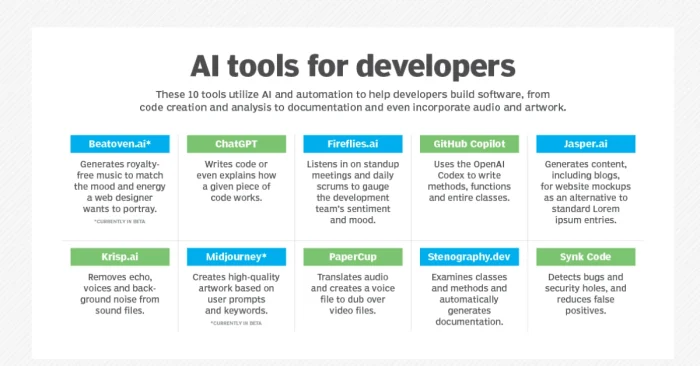
AI tools can be grouped into different categories such as code generation, debugging, testing, project management, DevOps automation, documentation, collaboration, and security. Each category plays a unique role in making development smarter and more efficient. These include AI Tools for App Development and AI tools for bug detection.
Best Uses of AI Tools for Developers
AI for Code Generation
Code generation tools assist developers by writing boilerplate code, suggesting functions, and auto-completing syntax. These tools help beginners learn faster and allow experienced developers to save time when working on large projects.
For developers who want to speed up boilerplate and exploration, check out AI code tools.
AI for Debugging
Debugging is one of the most time-consuming parts of development. AI tools automatically detect bugs, suggest fixes, and highlight areas of code that might cause performance issues. This reduces downtime and ensures more reliable software. Additionally, many teams leverage AI tools for bug detection to prioritize fixes.
AI for Testing
Testing software manually is tedious and prone to human error. AI-powered testing tools automate unit tests, regression tests, and performance tests. They also predict potential failures before deployment, making software more stable and secure.
AI for Project Management
Project management with AI capabilities help developers track tasks, estimate project timelines, and assign resources efficiently. They provide smart recommendations for prioritizing tasks and preventing project delays.
AI for DevOps Automation
AI streamlines DevOps by automating CI/CD pipelines, monitoring system performance, and optimizing resource allocation. This reduces manual interventions and ensures smoother deployments with fewer risks.
AI for Documentation
Maintaining proper documentation is often overlooked but is essential for long-term software success. AI documentation tools automatically generate project documentation, API references, and usage guides from codebases, saving hours of manual work.
AI for Collaboration
Developers working in teams benefit from AI collaboration tools that recommend task distribution, track progress, and improve communication across platforms like GitHub or Jira. This keeps teams aligned and efficient.
AI for Security
Cybersecurity is a major concern in software development. AI tools analyze code for vulnerabilities, detect unusual patterns, and provide real-time alerts to protect applications from threats. This proactive approach strengthens overall software security.
FAQs on AI Tools for Developers
1. What are the best AI tools for developers?
Some popular tools include GitHub Copilot for code generation, Tabnine for code completion, DeepCode for bug detection, and Testim for automated testing. The right tool depends on the developer’s specific needs and programming language.
2. Do AI tools support multiple programming languages?
Yes. Most AI coding tools support widely used programming languages such as Python, JavaScript, Java, C++, and more. Some even adapt based on the developer’s coding style and language preferences.
3. Are AI tools beginner-friendly?
Yes. Many AI tools are designed to help beginners learn coding by suggesting syntax, fixing errors, and explaining functions. This makes them useful for students, new developers, and professionals alike.