Introduction to Canva AI Image Generator
Canva AI Image Generator is a powerful tool that helps you create high-quality visuals with artificial intelligence. Integrated into the Canva platform, this feature empowers designers, marketers, social media managers, and content creators to generate images quickly from textual prompts. Since its rollout, Canva’s AI has evolved, offering faster rendering, improved style control, and better integration with Canva templates. The result is a streamlined design workflow where you can produce illustrations, social media posts, marketing assets, and concept visuals without advanced design skills. Canva AI Image Generator democratizes image creation by delivering an accessible, intuitive, and fast solution for beginners and professionals alike. For a practical guide on getting started with AI-assisted image creation, see How To Use AI To Generate Images.
How Canva AI Image Generator Works
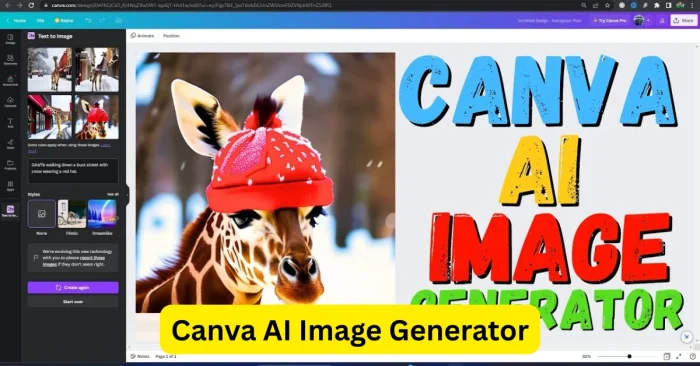
The Canva AI Image Generator utilizes deep learning and neural network models to interpret textual descriptions and produce visually appealing images. Users input prompts describing the subject, style, colors, and other visual elements. The AI then generates multiple image options based on the prompt. Canva also allows users to refine the results, adjust layouts, incorporate brand colors, and combine AI-generated elements with existing Canva templates. This integration streamlines the design process, enabling quick creation of professional-looking visuals for digital and print media without external software or extensive design knowledge. For a deeper dive into AI-based image generation workflows, see How To Use AI To Generate Images.
Key Features of Canva AI Image Generator
Canva AI Image Generator offers a variety of features that enhance design capabilities:
Text-to-Image Conversion
Users can generate images simply by entering descriptive text, transforming ideas into visuals instantly. This approach is compatible with broader AI image generation strategies described in AI Tools For Create Image.
Style Customization
AI-generated images can be customized with different artistic styles, including cartoon, realistic, abstract, and digital art to match specific projects.
Integration with Canva Templates
Generated images can be directly incorporated into Canva templates for social media posts, presentations, banners, or marketing materials. For more on AI-driven image creation workflows, see AI Tools For Create Image.
High-Resolution Export
Canva allows users to export AI-generated images in high resolution suitable for web, social media, or print projects.
User-Friendly Interface
The AI generator is built into Canva’s intuitive platform, making it accessible to beginners and professionals alike without technical expertise.
Top Canva AI Image Generator Tools and Functionalities
Canva provides several features powered by AI for enhanced image generation:
- Magic Design – Generates design suggestions and images based on prompts or uploaded content.
- Text-to-Image Tool – Converts textual descriptions into creative visuals with style and layout options.
- Image Enhancer – Refines AI-generated images by adjusting brightness, contrast, or details.
- Template Integration – Combines AI-generated visuals with ready-made Canva templates for faster design workflows.
- Collaborative Editing – Allows team members to edit and modify AI-generated images within shared projects.
Canva offers a range of AI-driven capabilities that align with broader image-generation tools and tutorials. For a broader comparison of AI tools for image generation, see Best AI For Image Generation.
Benefits of Using Canva AI Image Generator
Canva AI Image Generator offers several benefits for creators and businesses. It reduces design time by quickly generating visuals from textual prompts, eliminating the need for manual illustration or extensive design work. The tool enhances creativity by allowing experimentation with different styles, colors, and layouts. Canva’s integration with templates and design elements makes it easy to create professional-quality visuals suitable for marketing, social media, or personal projects. Its accessibility allows beginners to produce high-quality images without prior experience. Additionally, businesses can streamline content creation, improve workflow efficiency, and maintain brand consistency by leveraging Canva’s AI-powered features. This accessibility is echoed in our discussion of AI Image Generator Free Tools.
Workflow Tips for Using Canva AI Image Generator
Write Clear Prompts
Detailed prompts help the AI understand desired subjects, styles, and composition for accurate and creative outputs. For prompting strategies, see How To Use AI To Generate Images.
Experiment with Styles
Try different artistic styles or filters to see variations and discover unique visual ideas.
Combine with Templates
Integrate AI-generated images with Canva’s templates to create social media posts, presentations, banners, and marketing materials efficiently.
Refine Outputs
Use Canva’s editing tools to adjust image details, colors, and composition to suit specific project needs.
Collaborate on Projects
Share AI-generated images with team members for collaborative feedback, adjustments, and finalization.
Frequently Asked Questions (FAQs)
What is Canva AI Image Generator?
Canva AI Image Generator is an AI-powered tool that transforms text prompts into high-quality visuals within the Canva platform.
Is Canva AI Image Generator free?
Canva provides a free tier with AI image generation capabilities, though some advanced features may require a Canva Pro subscription as of 2025.
Do I need design skills to use Canva AI Image Generator?
No, the tool is designed to be intuitive, allowing beginners and professionals to create visuals easily using textual prompts.
Can AI-generated images be used commercially?
Yes, Canva allows commercial use of AI-generated images, but users should review Canva’s licensing terms to ensure compliance.
How can I improve results with Canva AI Image Generator?
Use detailed prompts, experiment with styles, refine outputs, and combine AI-generated images with templates to achieve professional-quality visuals. For prompting strategies, see How To Use AI To Generate Images.