Understanding AI 4K Video Enhancer
High-resolution video content remains in high demand, and delivering crisp 4K footage has become essential for creators, filmmakers, and marketers. AI 4K Video Enhancer tools use advanced machine learning to upscale video, reduce noise, correct motion blur, and restore lost detail. They make it possible to transform older or lower-quality footage into stunning 4K output quickly and efficiently. As AI upscaling matured in recent years, these tools have become accessible to independent creators and teams alike. In this guide, we’ll explore what AI 4K Video Enhancer tools are, how they work, the benefits and limitations, practical use cases, top tools available, and frequently asked questions. For a related approach, see AI Video Upscaler Tool.
What Is an AI 4K Video Enhancer?
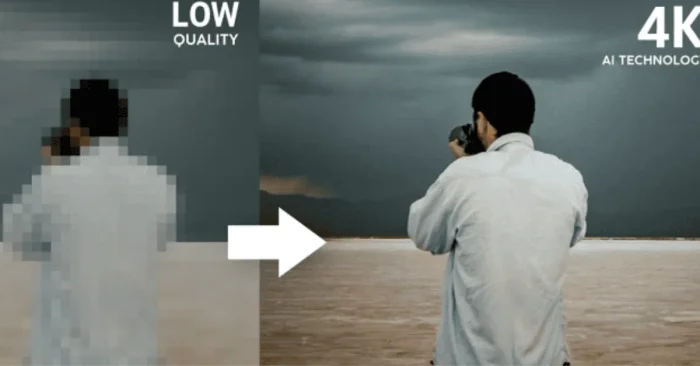
An AI 4K Video Enhancer is software that leverages artificial intelligence to improve video quality, upscale resolution to 4K, reduce noise, and restore fine details. Unlike traditional upscaling, which simply stretches pixels, AI-powered enhancers predict missing information and recreate detail intelligently.
How Does It Work?
These tools use deep learning models trained on high-quality video datasets. By analyzing patterns, textures, and motion, the software can upscale footage, smooth motion, reduce artifacts, and enhance clarity while maintaining natural-looking results. Similar AI upscaling concepts are used in the AI Video Upscaler Tool to enhance resolution without simply enlarging pixels.
Why It Matters in Content Creation
High-quality video is critical for audience engagement, streaming platforms, and professional projects. AI 4K Video Enhancer tools allow creators to maximize visual quality without expensive equipment or reshoots, making professional-grade content accessible to everyone.
Core Features
- Resolution upscaling to 4K and beyond
- Noise reduction and artifact removal
- Motion blur correction and stabilization
- Color and contrast enhancement
- Batch processing for multiple videos
- Compatibility with major editing software
Benefits and Limitations
Advantages
These AI tools save time, reduce production costs, and enable creators to produce visually appealing videos quickly. They also allow repurposing of older content for modern displays and streaming platforms.
Challenges and Limitations
Extremely low-quality sources may still have artifacts after enhancement. Processing large 4K videos requires significant computing power, and results may vary based on the complexity of motion and lighting conditions.
Who Can Benefit?
Filmmakers, YouTubers, marketers, content creators, and video editors can all benefit. Even businesses repurposing existing footage can achieve professional results without additional shooting.
Top Use Cases
- Upscaling old footage to 4K for streaming
- Improving social media video quality
- Enhancing drone and mobile recordings
- Professional post-production for films and ads
- Restoring archival or historical footage
For video projects that reuse still images or require close-up detail, you might also explore AI Tools for Photo Enhancement to adjust individual frames before upscaling.
Top 5 AI 4K Video Enhancer Tools
1. Topaz Video AI
A comprehensive tool for video upscaling and restoration, providing high-quality results with minimal manual adjustments.
2. Adobe Premiere Pro (Super Resolution & Sensei features)
Professional editing software with AI-powered super-resolution and enhancement tools built into the workflow.
3. DaVinci Resolve Studio (Super Scale)
Advanced color grading and video enhancement software with AI-driven upscaling and noise reduction.
4. Video2X
Open-source video upscaler using deep learning models to enhance resolution and quality for free.
5. Runway
Cloud-based AI tool for upscaling, restoration, and advanced video editing with intelligent enhancement features.
For video projects that focus on a cinematic look, see Cinematic Filter AI Tools to tailor color grading and filmic aesthetics, or explore the Timelapse Enhancer AI Tools for creating smooth, accelerated sequences during upscaling workflows. If your project involves zoom-heavy footage, you may also find the AI Zoom Video Enhancer useful for sharpening details in close-ups.
FAQs About AI 4K Video Enhancer
Can AI upscaling create real details?
AI predicts missing details using learned patterns. Results are highly realistic for moderate upscaling but may vary for extremely low-resolution footage.
Do I need a powerful computer?
Yes, processing 4K video requires a modern GPU or CPU. Cloud-based solutions can be used if local hardware is insufficient.
Can beginners use these tools?
Many tools are user-friendly and include presets for quick enhancement. Beginners can achieve professional results with minimal learning.
Are there free options?
Some open-source tools and trial versions exist, but professional tools usually require a paid subscription for full features and best quality output.