AI Color Correction AI Tools Explained in Depth
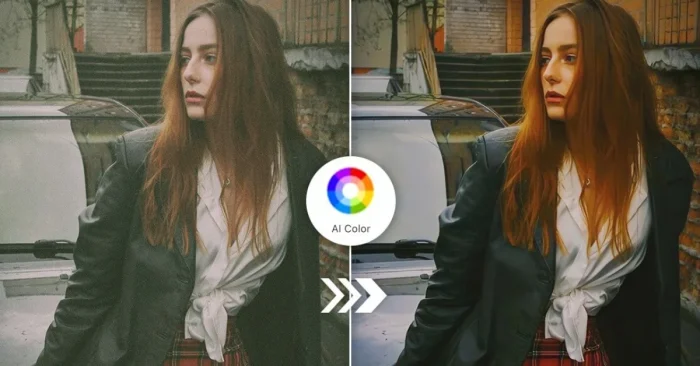
AI color-correction tools are changing how images and videos are enhanced by automatically adjusting colors, exposure, brightness, contrast, and tones. Powered by artificial intelligence, they analyze visuals to correct flaws and deliver professional-quality results with minimal manual editing. These capabilities have expanded rapidly in recent years. For a practical overview, see our guide on AI tools for video color grading.
What Are AI Color Correction AI Tools?
They are advanced software solutions that use artificial intelligence to balance and enhance colors in photos or videos automatically. For a broader look at AI-assisted editing workflows, see our guide on AI Tools for Photo Editing.
How Do They Work?
These tools analyze lighting, shadows, saturation, and tones using AI algorithms, then apply corrections for natural and balanced visuals.
Why Are They Important?
They save time, ensure color accuracy, and improve the overall visual quality for photographers, videographers, designers, and marketers.
Key Features
- Automatic color balancing and correction.
- Exposure and brightness adjustment.
- Contrast and saturation enhancement.
- White balance optimization.
- Batch processing for multiple files.
- High-resolution export options.
- AI-powered scene detection for accuracy.
Who Uses These Tools?
Photographers, video editors, content creators, designers, filmmakers, and marketers rely on AI color correction tools for consistent and polished outputs. For creative workflows in video, see our article on AI tools for video color grading.
Benefits and Limitations
Advantages: Saves time, delivers professional results, works automatically, improves workflow, and reduces human error.
Limitations: May struggle with highly artistic edits or nuanced color grading, and while many cloud tools require internet, offline desktop options are increasingly capable; premium features can be costly.
Industries That Benefit the Most
Film, photography, advertising, e-commerce, fashion, and social media industries gain the most from AI-powered color correction.
Best Practices
- Use high-quality inputs for better correction.
- Leverage batch editing to save time.
- Combine AI corrections with manual tweaks when needed.
- Choose the right export settings for your platform.
- Test multiple AI tools to find your preferred workflow (consider how they compare with traditional tools like AI vs Photoshop).
Top 5 Tools
Adobe Lightroom AI
Uses AI-driven auto-correction to enhance photo colors with professional accuracy.
Colorlab AI
A powerful video color grading tool that applies cinematic color correction automatically.
Skylum Luminar Neo
AI-powered software for photographers that corrects tones, lighting, and color balance instantly.
DaVinci Resolve
Offers advanced AI-based color grading features for films and high-end video production.
Pixlr AI
An easy-to-use online AI editor that adjusts colors and tones for fast visual improvements.
FAQs About AI Color Correction AI Tools
1. Do AI tools completely replace manual color editing?
No, they speed up the process, but professionals often fine-tune results manually for creative control.
2. Can these tools fix old or faded photos?
Yes, many restore faded colors and improve clarity in old photos.
3. Are AI color correction tools suitable for beginners?
Yes, they are beginner-friendly, requiring little to no editing knowledge.
4. Do these tools work offline?
Some desktop apps work offline, but many cloud-based AI tools need an internet connection.