Introduction to AI for Product Photography
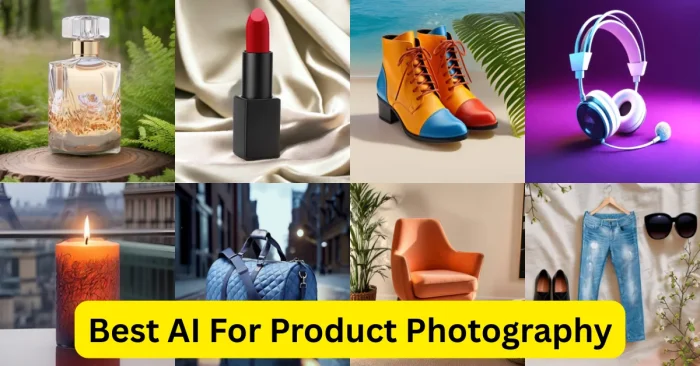
Artificial Intelligence has become a game-changer for product photography, enabling businesses to produce high-quality visuals without expensive gear or professional studios. Modern AI-driven workflows automatically enhance product images, remove or replace backgrounds, and optimize lighting for professional-grade results. This shift reduces costs and speeds up creation, helping ecommerce brands and small businesses scale their visual content more quickly. For a broader overview of AI-driven image workflows, see AI product image Tool.
Why Use AI for Product Photography
AI for product photography is widely used because of its efficiency and quality. It eliminates the need for traditional studio setups and makes professional product images possible within minutes. From automatic background removal to AI-powered retouching, these tools provide businesses with a competitive edge in online marketing. They also support faster product listings and social media updates, ensuring brands can maintain consistency across platforms. Furthermore, AI reduces editing time, allowing businesses to focus on growth instead of manual design work. For a broader context, see our AI ECommerce Product Images Tools resource.
Features of AI Product Photography Tools
AI product photography tools come with a range of advanced features. They can remove cluttered backgrounds and replace them with clean, professional designs. Many tools include AI lighting adjustments, ensuring products look well-lit even without a pro setup. AI retouching smooths textures, sharpens details, and enhances colors for greater appeal. Some platforms also offer automatic resizing and optimization for marketplaces like Amazon, eBay, or Shopify. These capabilities help businesses create visuals that are consistent, marketing-ready, and faster to publish. If you’re exploring capabilities in more depth, see AI Tools for Photo Editing.
Top AI Tools for Product Photography
Several AI-based tools stand out for their efficiency in product photography. These tools are widely used by e-commerce sellers, small businesses, and marketing agencies.
- Remove.bg – Specializes in automatic background removal for clean product images. For a broader overview of AI product image workflows, see AI product image Tool.
- Claider.ai – Helps e-commerce brands create consistent product images with AI-powered editing. Learn more in our AI ECommerce Product Images Tools guide.
- Photoroom – Offers instant background removal, AI lighting, and templates for product photography. See also AI Tools for Photo Editing for broader editing capabilities.
- VistaCreate – Provides AI editing tools for marketing-ready product visuals. Check our AI product image Tool overview for more context.
- Smartshoot – Focuses on automated product photography with AI-enhanced results. Compare with other approaches in AI vs Photoshop.
How AI Improves Product Photography
AI enhances product photography by making it faster, more affordable, and highly efficient. Businesses no longer need to rent professional studios or hire photographers for every photoshoot. AI tools allow them to take pictures with a basic camera or even a smartphone and transform them into professional-quality visuals. This technology ensures that images are optimized for online platforms, driving higher conversions and customer engagement. By maintaining image consistency and visual appeal, AI helps businesses build stronger brand identities and improve their overall marketing efforts. To see how AI compares with traditional editing workflows, read our AI vs Photoshop article.
Best AI Tool for Product Photography with Subsections
Remove.bg
Remove.bg is one of the most popular AI tools for product photography, specializing in background removal. It allows users to create clean, studio-like product images instantly. Its simplicity and speed make it perfect for e-commerce sellers.
Photoroom
Photoroom offers advanced AI editing features, including background replacement, lighting adjustment, and product templates. It is widely used for Instagram shops, Shopify stores, and Amazon sellers looking for polished product visuals. For more on AI editing workflows, see How To Edit Pictures With AI Tools.
Claider.ai
Claider.ai helps businesses maintain consistent product photos across platforms. It uses AI to enhance details, adjust color tones, and optimize images for e-commerce platforms. You can explore broader AI-driven image strategies in our AI product image Tool guide.
VistaCreate
VistaCreate provides AI-powered design tools that support both editing and creating marketing-ready product images. It is ideal for brands wanting quick turnaround times for social media and online stores. Learn more in our AI Tools for Photo Editing resource.
Smartshoot
Smartshoot combines automation with AI enhancement to deliver professional-looking product images. It helps reduce costs while ensuring quality suitable for online marketplaces. For a broader comparison, check AI vs Photoshop guidance.
Frequently Asked Questions (FAQs)
What is AI product photography?
AI product photography refers to the use of artificial intelligence tools to enhance, edit, and optimize product photos for online selling and marketing purposes.
Is AI product photography better than traditional studios?
While traditional studios offer full control, AI product photography is faster, more affordable, and convenient for businesses needing high-quality images in less time. For broader context on editing approaches, see our AI Tools for Photo Editing guide.
Which AI tool is best for e-commerce sellers?
Remove.bg and Photoroom are considered the best AI tools for e-commerce sellers as they offer quick background removal and professional-quality results. For a broader overview of related tools, visit our AI product image Tool page.
Do AI photography tools work with smartphones?
Yes, many AI product photography tools can enhance smartphone images, making them look as polished as studio photos.
Are AI product photography tools free?
Some tools like Remove.bg and Photoroom offer free versions with limited features, while premium plans unlock advanced editing and high-resolution downloads. If you’re exploring prompts and workflows, see AI Prompt For Product Photos.